
.webp?width=254&height=134&name=Image%20(7).webp)
.webp?width=72&height=78&name=Vector%20(6).webp)
-1.webp?width=254&height=137&name=Ellipse%201%20(1)-1.webp)



If you're analyzing your SEO traffic in Google Search Console on the one hand and your conversions in HubSpot on the other, you may be missing the point.
You're juggling between two tabs, trying to link an increase in clicks to a new opportunity or a contract signing. It's hard work, and above all, it's not productive. Without centralized data to drive your content strategy, you're posting blind.
Integrating Google Search Console directly into HubSpot is a game-changer. It turns your CRM into a control tower capable of telling you not only which keywords are attracting traffic, but in particular which ones are attracting the right prospects.
Why centralize your SEO data in your CRM?
Centralizing Search Console in HubSpot allows you to lift the veil on two invisible opportunities:
- The intent behind the click: you can see which topics capture the attention of your target accounts before they even fill in a form.
- The optimization of "easy targets": identify at a glance those pages that are in position 11 or 12 on Google and need only a slight push to double your qualified traffic.
How to optimize your content without leaving HubSpot?
Before diving in, here are the essential prerequisites:
For integration to work, make sure you check these three boxes:
- Be a super administrator on your HubSpot portal.
- Be the owner of the property in Google Search Console.
- Have a domain already validated and active on Google before attempting the connection.
Step 1: Activate the connection
-
In HubSpot: Settings > Integrations > Application Marketplace.
-
Click action: once the application has been found, click on Install application.
-
Pop-up window: specify that a Google window will appear to request authorization. Click on Authorize.
-
Property selection: once connected, HubSpot displays a list of properties. Check the one that corresponds to the domain managed by HubSpot.
Step 2: Access your control tower to view your data
Once connected, HubSpot starts importing your historical data. To view it, go to Marketing > Website > SEO.
Click on the Analyze tab. This is where you'll see your Google metrics cross-referenced with your HubSpot pages. You can even filter the results by country to refine your analysis if you're targeting multiple markets.
Identify your high-potential pages (CTR optimization):
In HubSpot's SEO tool, analyze your pages with lots of impressions but few clicks.
- The action: your title (H1) or meta-description doesn't respond precisely enough to search intent. Modify them directly in Content Hub and observe the impact on your sessions in real time.
What you actually measure: HubSpot synchronizes four vital metrics directly on your content sheets:
- Impressions: how many times you appear in the results.
- Clicks: the number of visits generated.
- CTR (click-through rate): the effectiveness of your title and meta-description.
- Average position: your exact ranking on the search engine.
Step 3: Align your content with your prospects' questions
Look at the actual queries that lead to your pillar pages.
Use Search Queries to decode intent. Don't just look at aggregate data.
In HubSpot, go to the Optimization tab of your website pillar pages or blog posts to consult the Search Queriessection .
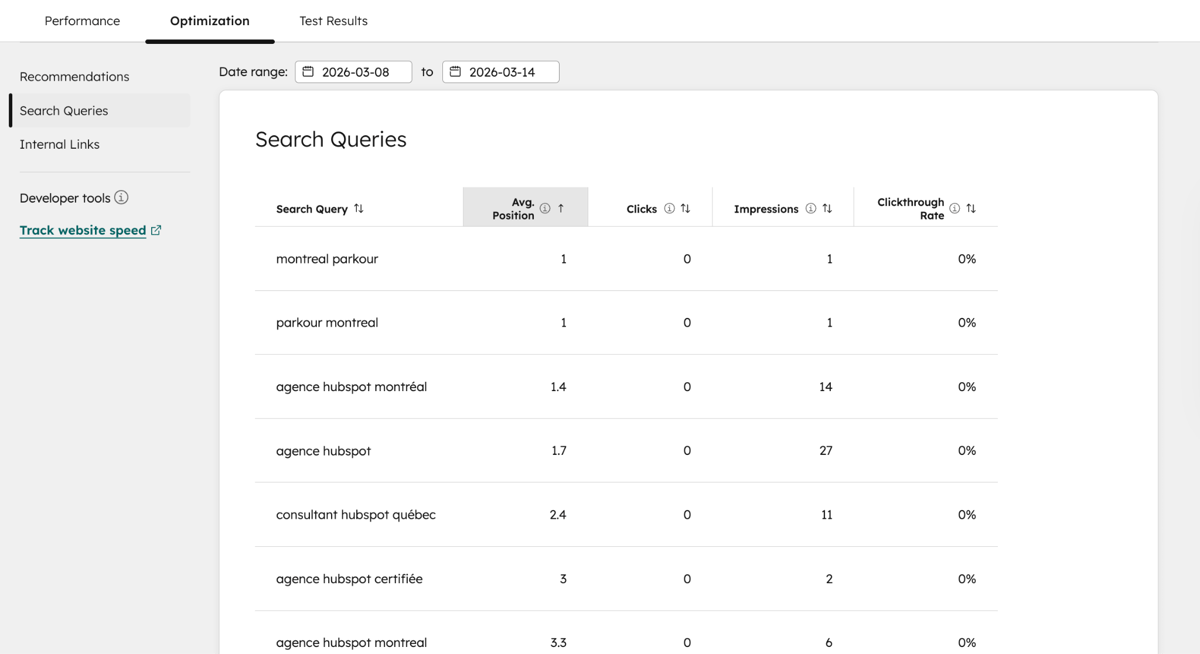
As you can see in the interface, HubSpot lists the actual queries that generated impressions for that specific page (e.g. "what are the hubspot implementation steps").
This is gold: if a query generates a lot of impressions but your page doesn't directly answer that question, you've got your next content update right there.
- Action: If visitors arrive on your site with a specific question that you don't clearly answer, add a Q&A section or a dedicated paragraph. This is the key to becoming the source of truth that Google's AI (AIO) will love to quote.
Step 4: Prioritize content updates
Don't waste time rewriting blog articles that aren't performing. Concentrate your efforts on pages that are already generating impressions.
- Action: update statistics, add internal links to your service pages, and reinforce your CTAs on these strategic pages.
From Google ranking to sales pipeline: measuring success
Thanks to the integration, you can create HubSpot reports that cross-reference :
- The number of GSC clicks.
- The number of new contacts generated by these pages.
- The amount of associated transactions.
The question is no longer how many people saw your article, but how much revenue this article injected into your pipeline.
SEO isn't a technical silo, it's a component of your revenue strategy. If you're not measuring the impact of your keywords on your sales, you're sailing blind.
Is your HubSpot instance optimized to turn your SEO data into business opportunities?
Parkour3 is a HubSpot Elite partner agency in Montreal who helps Quebec companies optimize their digital presence. Our digital marketing experts can help you develop a high-performance SEO/GEO strategy, from technical audit to content creation.